Documentation
How Changy evaluates change plans, and how to configure it.
Overview
Changy ingests a company's change-management policy, a draft change plan, and any supporting documents or codebases; evaluates the plan for gaps against a rubric derived from that policy (or a generic ITIL v4 checklist if no policy is supplied); helps fill those gaps through a follow-up interview; and generates audience-specific communications for end users, management, stakeholders, and colleagues.
Version 0.1.0: evaluation, interview, and communications generation are verified end to end with real runs against the bundled model. The Jira, Confluence, Jamf Pro, and Intune integrations, plus web search, are unit-tested against mocked responses only — not yet validated against real instances. See the status section on the product page for the full picture.
Requirements
- macOS 26 (Tahoe) or later
- Apple Silicon, if using the bundled on-device model (no restriction if using an OpenAI-compatible API backend instead)
- ~4.3GB free space for the bundled Qwen2.5-7B-Instruct (4-bit) model, already inside the signed app — no first-run download
Installation
Download Changy (a 3.6 GB .zip — most of that is the bundled on-device model), then:
- Unzip it
- Drag
Changy.appto/Applications - Open it
Signed and notarized with a Developer ID Application certificate — Gatekeeper opens it normally, no right-click-to-open workaround needed.
Try It With the Examples
Two example documents, built to exercise the full evaluate → interview → enrich pipeline end to end, are available to download below — they aren't bundled inside the app download itself, so grab them separately:
company-policy-example.md
A fictional company's IT change-management policy with 7 concrete, checkable criteria — risk assessment, backout plan, testing, CAB approval, change window, communication, and post-implementation review.
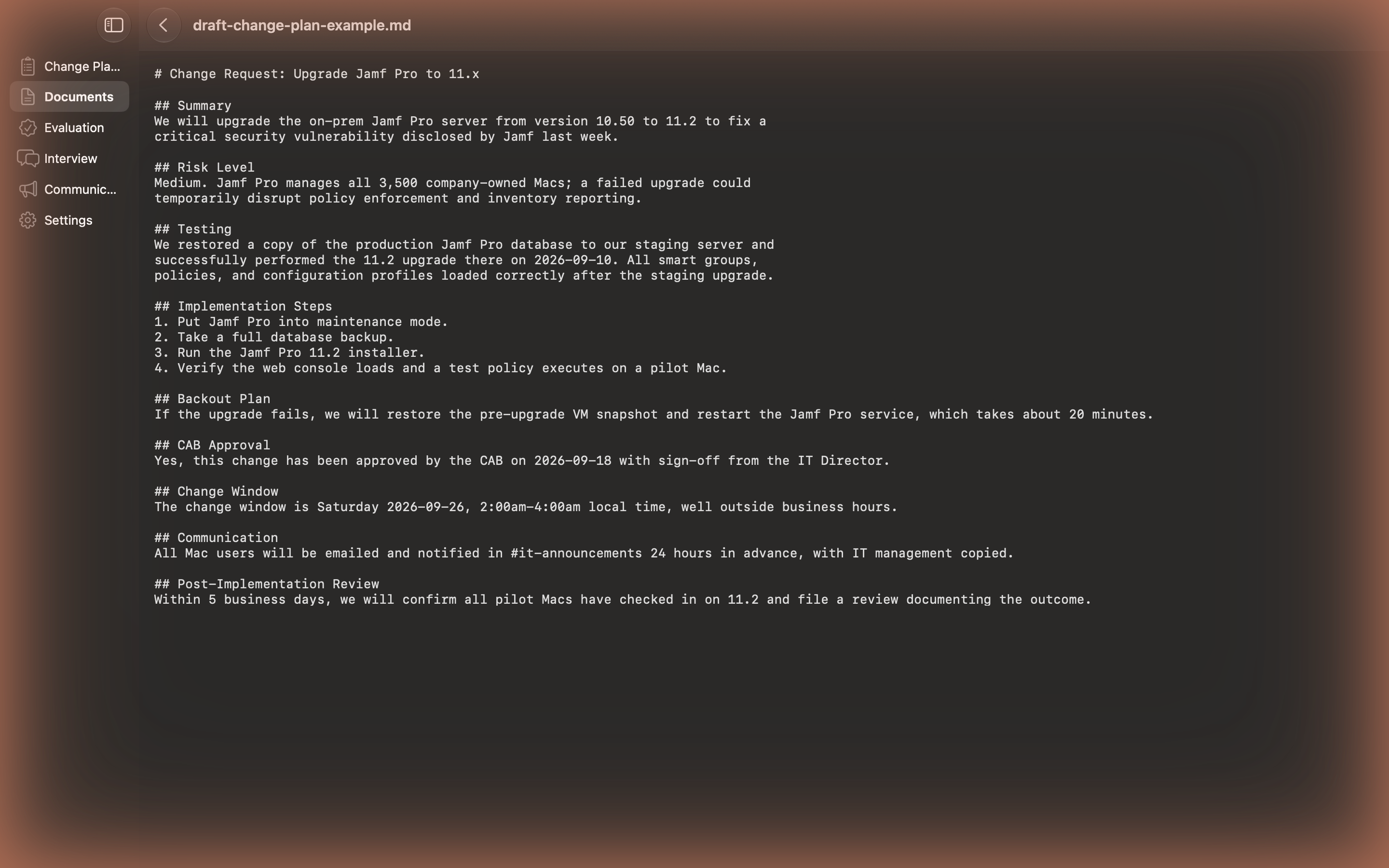
draft-change-plan-example.md
A deliberately incomplete draft change plan (a Jamf Pro upgrade) that satisfies some of that policy's criteria and is missing others, so a real evaluation run has genuine gaps to find.
Add the policy file as the Company Policy document and the draft plan as the Draft Change Plan:

Run an evaluation. Against this pair, a real run scores it 2 of 7 criteria satisfied (Risk Assessment, Testing), 1 partially satisfied (CAB Approval — the plan states the risk level but never mentions sign-off), and 4 missing (Backout Plan, Change Window, Communication, Post-Implementation Review) — each finding cites the specific part of the plan it's based on:

The Interview screen turns each gap into a concrete follow-up question. Answer them, apply the answers, and the plan is revised in place:

From there, Communications generates an audience-appropriate write-up in one click — see the feature grid above for an example.
How Configuration Works
Every setting has three possible sources, checked in this order:
- MDM-forced — pushed via a Configuration Profile's Managed Preferences payload. The app detects a value was actually forced by an administrator (not just present) via
CFPreferencesAppValueIsForced, and locks the corresponding control in Settings with the usual "set by your organization" treatment. - User Settings — whatever the user set in-app, stored in standard
UserDefaults. - Built-in default — used if neither of the above set a value (e.g. the local MLX backend, or every integration off).
Any MDM — Jamf, Kandji, Intune, or a manually installed profile — can push this configuration. It's an "Application" / custom-preferences payload of type com.apple.ManagedClient.preferences, targeting the app's bundle identifier, com.spectrechen.changy, as the domain.
Configuration Reference
Every key Changy reads, exactly as it appears in the shipped configuration schema:
| Key | Type | Default | Purpose |
|---|---|---|---|
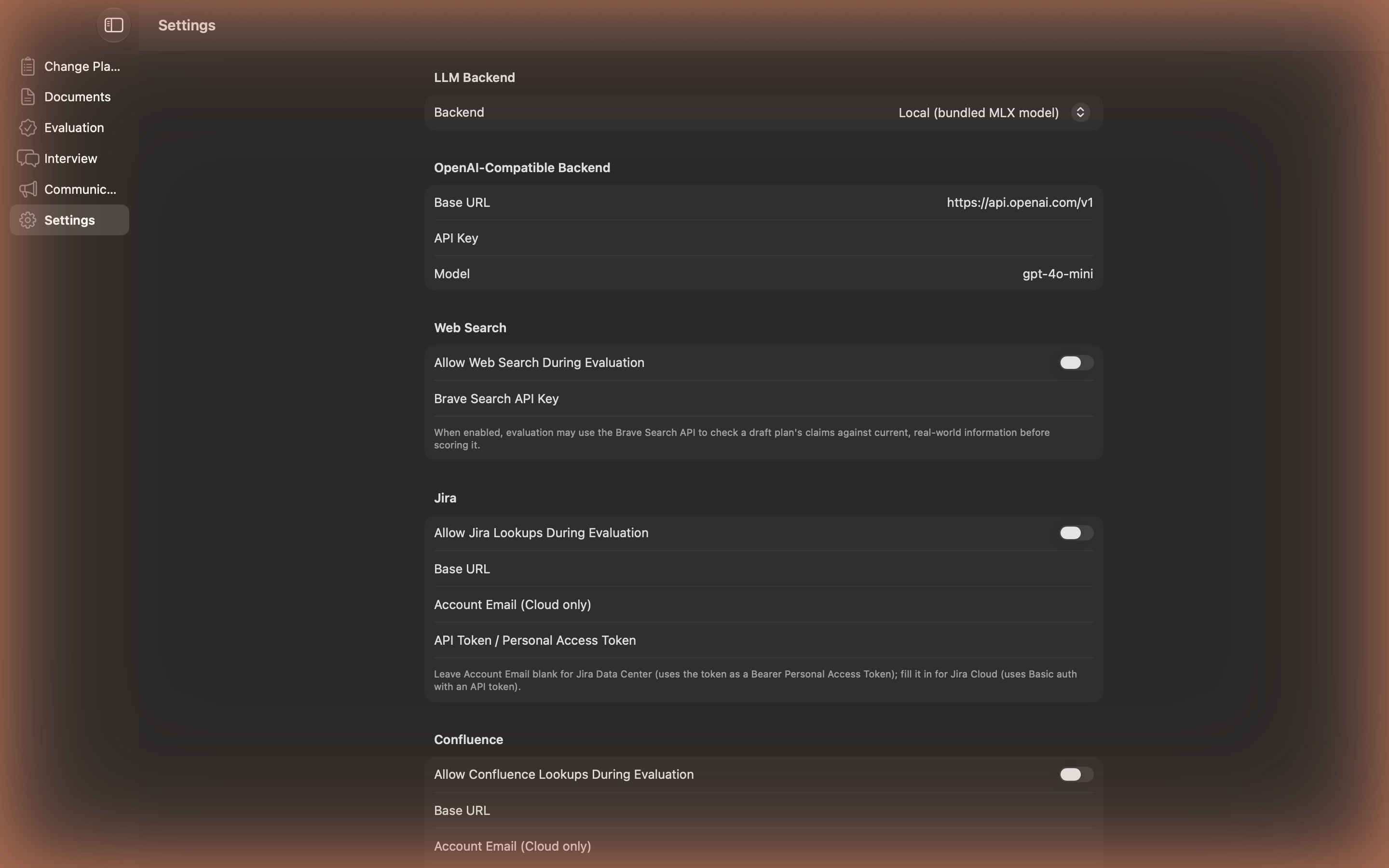
forcedBackend | String | mlx | Which LLM backend to use: mlx or openAICompatible |
openAICompatibleBaseURL | String | https://api.openai.com/v1 | Base URL for the OpenAI-compatible backend |
openAICompatibleAPIKey | String | empty | API key for that endpoint |
openAICompatibleModelName | String | gpt-4o-mini | Model name to request |
webSearchEnabled | Bool* | false | Allow evaluation to check claims via Brave Search |
braveSearchAPIKey | String | empty | Brave Search API key |
jiraEnabled | Bool* | false | Enable the Jira lookup tool |
jiraBaseURL / jiraEmail / jiraAPIToken | String | empty | Jira connection details (see below) |
confluenceEnabled | Bool* | false | Enable the Confluence lookup tool |
confluenceBaseURL / confluenceEmail / confluenceAPIToken | String | empty | Confluence connection details (see below) |
jamfEnabled | Bool* | false | Enable the Jamf Pro lookup tool |
jamfBaseURL / jamfClientID / jamfClientSecret | String | empty | Jamf Pro API client credentials |
intuneEnabled | Bool* | false | Enable the Microsoft Intune lookup tool |
intuneTenantID / intuneClientID / intuneClientSecret | String | empty | Intune app registration credentials |
* Booleans are pushed as the literal string "true" or "false" in the profile, not a plist <true/>/<false/> — Managed Preferences values are read as strings.
Security Note
Managed Preferences are plaintext. Any value pushed this way — API keys, client secrets — lands in /Library/Managed Preferences/com.spectrechen.changy.plist as plaintext, readable by anyone with defaults read access to that Mac. This is an accepted tradeoff for an enterprise-managed, FileVault-encrypted fleet, not a secrets vault. Only push real secrets this way on devices you already trust for that purpose, and only force the keys you actually want centrally controlled — omit anything you want users or Settings to keep control of.
Local Model (MLX)
The default backend. A bundled, 4-bit-quantized Qwen2.5-7B-Instruct model runs entirely on-device via Apple's MLX framework — no first-run download, fully offline. This is what forcedBackend: mlx selects, and it's the default if the key isn't set at all.
OpenAI-Compatible API
Point Changy at any OpenAI-compatible endpoint instead — useful for centralizing on an org-wide model deployment rather than the bundled local one.
<key>forcedBackend</key>
<string>openAICompatible</string>

<key>openAICompatibleBaseURL</key>
<string>https://api.openai.com/v1</string>

<key>openAICompatibleAPIKey</key>
<string>sk-...</string>

<key>openAICompatibleModelName</key>
<string>gpt-4o-mini</string>
Jira & Confluence
Off by default, independently toggled. Both share the same two-field auth shape: leave *Email blank for a Data Center instance (the token is used as a Bearer PAT), or fill it in for Cloud (Basic auth with the token as an API token).
<key>jiraEnabled</key>
<string>true</string>
<key>jiraBaseURL</key>
<string>https://yourcompany.atlassian.net</string>
<key>jiraEmail</key>
<string>you@yourcompany.com</string>
<key>jiraAPIToken</key>
<string>...</string>

<key>confluenceEnabled</key>
<string>true</string>
<key>confluenceBaseURL</key>
<string>https://yourcompany.atlassian.net/wiki</string>
<key>confluenceEmail</key>
<string>you@yourcompany.com</string>
<key>confluenceAPIToken</key>
<string>...</string>
Jamf Pro
Authenticates the same way Jarl does — a Jamf Pro API Role and API Client (client ID + secret), configured under Settings → System → API Roles and Clients in Jamf Pro.
<key>jamfEnabled</key>
<string>true</string>
<key>jamfBaseURL</key>
<string>https://yourcompany.jamfcloud.com</string>
<key>jamfClientID</key>
<string>...</string>
<key>jamfClientSecret</key>
<string>...</string>
Microsoft Intune
Uses an Azure AD app registration (tenant ID + client ID + client secret).
<key>intuneEnabled</key>
<string>true</string>
<key>intuneTenantID</key>
<string>...</string>
<key>intuneClientID</key>
<string>...</string>
<key>intuneClientSecret</key>
<string>...</string>
Not yet validated against real servers: all four enterprise integrations, plus web search, are implemented and unit-tested against mocked responses only — no test credentials were available during development. Validate against a real instance before relying on them in production.
Web Search
An optional tool (Brave Search API) the model can invoke during evaluation to check a draft plan's claims against current, real-world information. Off by default — enabling it sends the plan's rubric criteria and derived search queries to a third-party search API, which an organization may not want without opting in.
<key>webSearchEnabled</key>
<string>true</string>
<key>braveSearchAPIKey</key>
<string>...</string>