Documentation
How entAI routes requests, and how to configure it by MDM.
Overview
entAI brings your organization's OpenAI-compatible AI service to the Mac. Every request runs on the on-device model first; only what it can't handle goes to the company AI, and only as your MDM policy allows. Two surfaces: a menu bar chat (window + a Spotlight-style Quick Chat opened by double-pressing ⌥) and right-click Services actions on selected text and files.
No telemetry. entAI talks to nothing but the company AI endpoint you configure (and Entra ID for sign-in, if used). Chat history stays on the Mac unless you disable retention.
Requirements
- macOS 26 or later, Apple Silicon only
- 8 GB RAM minimum — the bundled on-device model needs about 2.7 GB free
- An OpenAI-compatible endpoint for cloud escalation (optional — entAI works local-only without one)
Installation & Deployment
- Install
EntAI-1.0.0.pkg— signed and notarized, installs/Applications/EntAI.app(~2.6 GB, including the on-device model). - Configure with a profile for domain
com.spectrechen.entai, starting from the example profile below. Without a profile, entAI works device-only, and the user can still enter a server themselves in Settings. - (Recommended) grant Accessibility via PPPC — see PPPC & Accessibility.
- Company AI credentials: Entra ID needs no secret; API keys go in the user's keychain — see API Keys.
- (Optional) add
Scripts/ea-entai-usage.shas a Jamf Extension Attribute or Intune custom attribute — see Usage Statistics.
entAI starts at login with a menu bar icon and no Dock icon. It ships without keyboard shortcuts for its Services entries, so it never overrides shortcuts you already use — users assign their own under System Settings → Keyboard → Keyboard Shortcuts → Services.
How Configuration Works
Every setting is optional. A key set by a configuration profile is locked in Settings (shown with a lock badge); any key you don't set stays user-editable. Booleans accept either <true/> or the string "true". Changes are picked up the next time entAI becomes active — macOS doesn't notify running apps when a new profile lands.
Managed Preferences are plaintext. Never put API keys or secrets directly in a configuration profile. Cloud API keys belong in the keychain — see API Keys — and Entra ID needs no secret at all.
How Routing Works
| Situation | Goes to |
|---|---|
Fits the local model (≤ LocalMaxInputTokens, default 6,000 — roughly 4–5 pages) | This Mac |
| Too long, contains images, or no local model fits in free memory right now | Company AI — asked first under CloudPolicy=ask, automatically under automatic, refused under never |
| User explicitly chose "Keep on this Mac" / "Ask Company AI" (per message, or Try Again) | That choice — an explicit cloud choice always counts as consent |
Action with ActionRouting = local / cloud | Always local, or preferably cloud |
| Neither is possible | Refused, with the reason and what to do — never chunked or truncated |
The local model is chosen per request from the most capable installed model that fits into free memory at that moment — the model itself never decides where it runs, the router does, deterministically. On 8 GB Macs under memory pressure, expect more frequent cloud escalation. The local model loads on first use and unloads after 5 idle minutes.
Company AI (Cloud) Keys
| Key | Type | Default | Meaning |
|---|---|---|---|
CloudBaseURL | String | empty | OpenAI-compatible endpoint, e.g. https://ai-gateway.corp.example/v1. An Azure resource URL gets /openai/v1 appended automatically. Must be HTTPS (localhost excepted). Empty = no cloud at all. |
CloudAuthMode | String | apiKey | apiKey / azureAPIKey / entraID / none |
CloudDefaultModel | String | — | Model name, or the Azure deployment name |
CloudModels | Array of strings | — | Models the user may pick from; the default model is always included |
CloudModelPickerEnabled | Bool | true | Show the model picker (only relevant if CloudModels has more than one) |
CloudDisplayName | String | Company AI | Name shown in the UI, e.g. "Send to Contoso AI?" |
CloudAllowInsecureHTTP | Bool | false | Test labs only — accept http:// endpoints other than localhost |
CloudPolicy | String | ask | See below |
CloudCostPer1KTokens | Real | 0 | Blended cloud price, shown as "cloud cost avoided" in Settings → Usage only |
CloudPolicy — exact semantics
never— nothing leaves the Mac; requests the local model can't handle are refused.ask— the user confirms each automatic escalation. An explicit "Ask Company AI" click counts as consent.automatic— escalates without asking; every answer still shows its source badge.
On-Device Model
| Key | Type | Default | Meaning |
|---|---|---|---|
LocalModelEnabled | Bool | true | false = cloud only |
LocalMaxInputTokens | Integer | 6000 | Estimated-token ceiling (including history/files) for the local model; above this it escalates or refuses |
UserRouteOverrideEnabled | Bool | true | Whether users may choose "Keep on this Mac" / "Ask Company AI" per message and retry |
ActionRouting | Dict | — | Per-action override, e.g. summarize → cloud |
Larger models can be deployed to /Library/Application Support/entAI/Models/<model-id>. The bundled model is Gemma 4 E2B (text-only, Apache 2.0 licensed).
Chat Settings
| Key | Type | Default | Meaning |
|---|---|---|---|
ChatHistoryEnabled | Bool | true | Keep conversations on disk |
ChatHistoryRetentionDays | Integer | 30 | Delete untouched conversations after N days; 0 = keep forever |
AttachmentsEnabled | Bool | true | Files in chat and Finder file actions |
ShowRouteBadge | Bool | true | Show the "On this Mac · model" / "Company AI · model" badge |
HotkeyEnabled | Bool | true | Double-press ⌥ opens Quick Chat (needs Accessibility) |
LaunchAtLogin | Bool | true | Register as a login item |
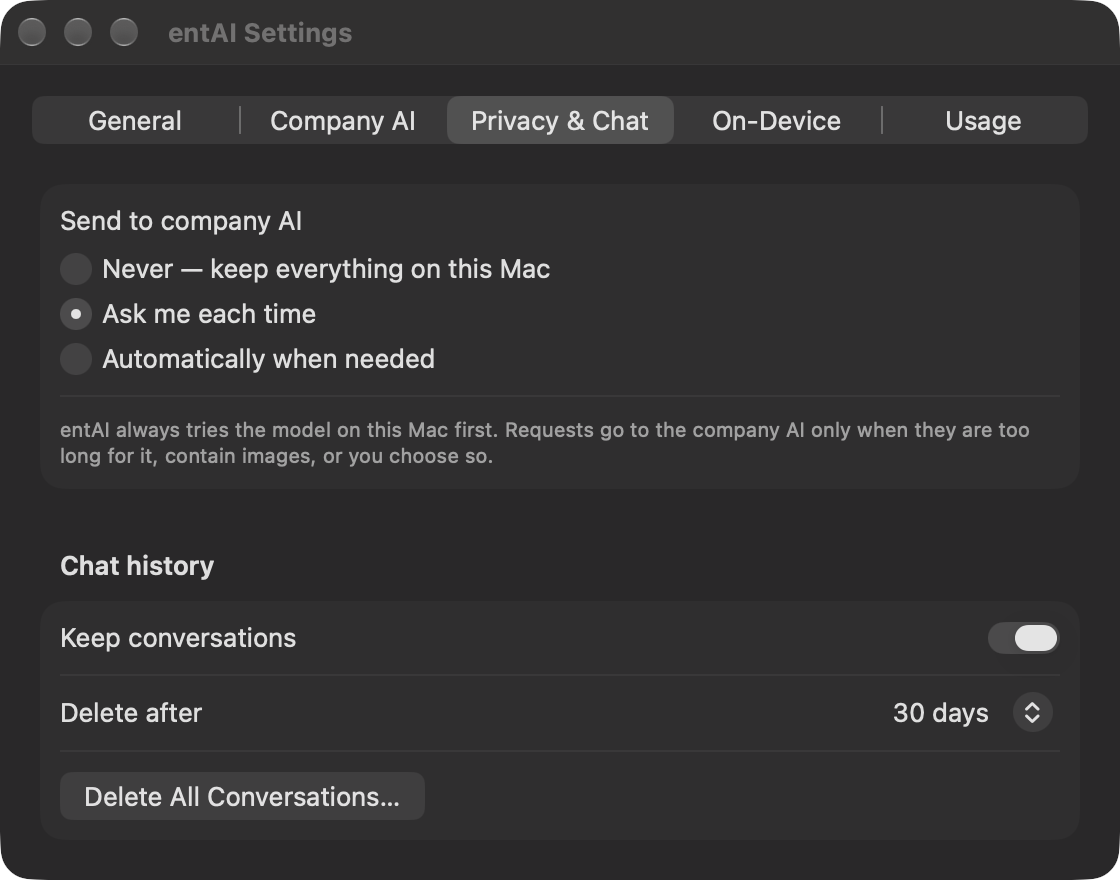
CloudPolicy choice and chat history controls, in the UI.Actions & Custom Actions
Built-in actions, in Services-menu order: summarize, translate, rephrase, improve, fixGrammar, rewriteFormal, rewriteCasual, rewriteConcise, explain, keyPoints, actionItems, draftReply.
| Key | Type | Meaning |
|---|---|---|
EnabledActions | Array | Which built-in actions are available (default: all) |
CustomActions | Array of dicts | Fields: ID, Title, Prompt (required), Icon (SF Symbol), Routing (auto/local/cloud), Input (text/file/both), OutputRatio (default 1.0). A custom action reusing a built-in ID replaces it. |
TranslationLanguages | Array | Languages offered for Translate (default: English, German, French, Spanish, …) |
DefaultTranslationLanguage | String | Translate target language — defaults to the Mac's own language |
The Services menu itself is fixed (Summarize, Translate, Rephrase, Fix Spelling & Grammar, Explain, More Actions…, Ask in Chat; for files: Summarize File, Ask About File, File Actions…) — everything beyond those lives under "More Actions…" / "File Actions…". Disabling a fixed entry still shows it, but tells the user it's disabled rather than just disappearing silently.
Microsoft Entra ID — Setup Steps
Not yet verified against a real tenant. Entra ID sign-in is implemented and unit-tested (PKCE, URLs, token parsing) but has not been exercised against a live Microsoft Entra tenant. Verify in a test tenant before rolling it out.
entAI authenticates as a public client — OAuth 2.0 authorization code + PKCE via ASWebAuthenticationSession, no client secret, no MSAL. After the first sign-in, tokens refresh silently from the keychain; with the Microsoft Enterprise SSO plug-in and entAI allow-listed, the sign-in sheet completes without a password at all.
- In the Entra admin center: App registrations → New registration — name it
entAI, single tenant. - Authentication → Add a platform → Mobile and desktop applications — custom redirect URI
msauth.com.spectrechen.entai://auth. - Authentication → Advanced settings — set Allow public client flows: Yes.
- API permissions — for Azure OpenAI directly, add Azure Cognitive Services → user_impersonation and grant admin consent. For your own gateway (e.g. APIM), add the gateway API's own scope instead and set
EntraScopeaccordingly. - Note the Application (client) ID and Directory (tenant) ID for the profile below.
For Azure OpenAI, the signed-in user or group also needs the Cognitive Services OpenAI User role on the Azure OpenAI resource itself.
Profile keys
<key>CloudAuthMode</key><string>entraID</string>
<key>EntraTenantID</key><string>contoso.onmicrosoft.com</string>
<key>EntraClientID</key><string>...client id...</string>
<!-- only when routing through a gateway rather than Azure OpenAI directly: -->
<key>EntraScope</key><string>api://.../.default</string>| Key | Default | Meaning |
|---|---|---|
EntraTenantID | — | Tenant ID or domain |
EntraClientID | — | Application (client) ID of the public-client app registration |
EntraScope | https://cognitiveservices.azure.com/.default | Token scope — override for a gateway's own App ID URI + /.default |
EntraRedirectURI | msauth.com.spectrechen.entai://auth | Must match the app registration exactly |
For silent sign-in via the Microsoft Enterprise SSO plug-in, add entAI to its allow list in the Extensible Single Sign-On payload:
<key>AppPrefixAllowList</key>
<string>com.microsoft.,com.apple.,com.spectrechen.entai</string>
Entra Error Codes
| Error | Cause |
|---|---|
AADSTS50011 | Redirect URI mismatch — recheck the platform configuration step |
AADSTS7000218 | Public client flows not allowed — enable that in Authentication → Advanced settings |
| 401 from Azure OpenAI | Missing the Cognitive Services OpenAI User role, or wrong EntraScope |
Errors surface with their exact Entra code in both Settings → Company AI and directly in chat. Signing out from Settings → Company AI removes the stored refresh token.
Data & Privacy
| What | Where | Leaves the Mac? |
|---|---|---|
| Chat history | ~/Library/Application Support/entAI/Conversations/*.json (owner-only) | No — deleted after ChatHistoryRetentionDays, or disable entirely with ChatHistoryEnabled |
| Usage counts (no content) | ~/Library/Application Support/entAI/UsageStats.plist | Only if your inventory script collects it |
| API key / Entra refresh token | Login keychain, service com.spectrechen.entai | Sent only to your configured service |
| Prompts and files | Memory only | Only when routed to the company AI, as policy allows — always with a visible source badge |
PPPC & Accessibility
Recommended: allow Accessibility for com.spectrechen.entai, needed for double-press ⌥ to work in other apps and for Replace to work in text actions. Without it, ⌥⌥ only works inside entAI itself, and Replace falls back to just copying.
anchor apple generic and identifier "com.spectrechen.entai" and certificate leaf[subject.OU] = "23VFRTF5KC"API Keys
API keys are never stored in configuration profiles — they live in the user's login keychain, service com.spectrechen.entai, account apiKey. A user can paste one into Settings directly, or a script can provision it (run as the user):
security add-generic-password -U -s com.spectrechen.entai -a apiKey \
  -T "/Applications/EntAI.app" -w "$KEY"
Example Profile
The distribution's example profile (Azure OpenAI + Entra ID) demonstrates most of the config surface in one file:
- Company AI:
CloudBaseURL,CloudAuthMode=entraID,CloudDefaultModel,CloudModels,CloudDisplayName,CloudPolicy=ask,CloudCostPer1KTokens, plus the matchingEntraTenantID/EntraClientID. - Routing:
LocalMaxInputTokens=6000, anActionRoutingentry forcingfixGrammarlocal. - Chat: history enabled, 30-day retention, attachments on.
- Custom actions: a "Customer Reply" action tuned to a house tone, and a "Check Contract Wording" action forced to the cloud.
Usage Statistics
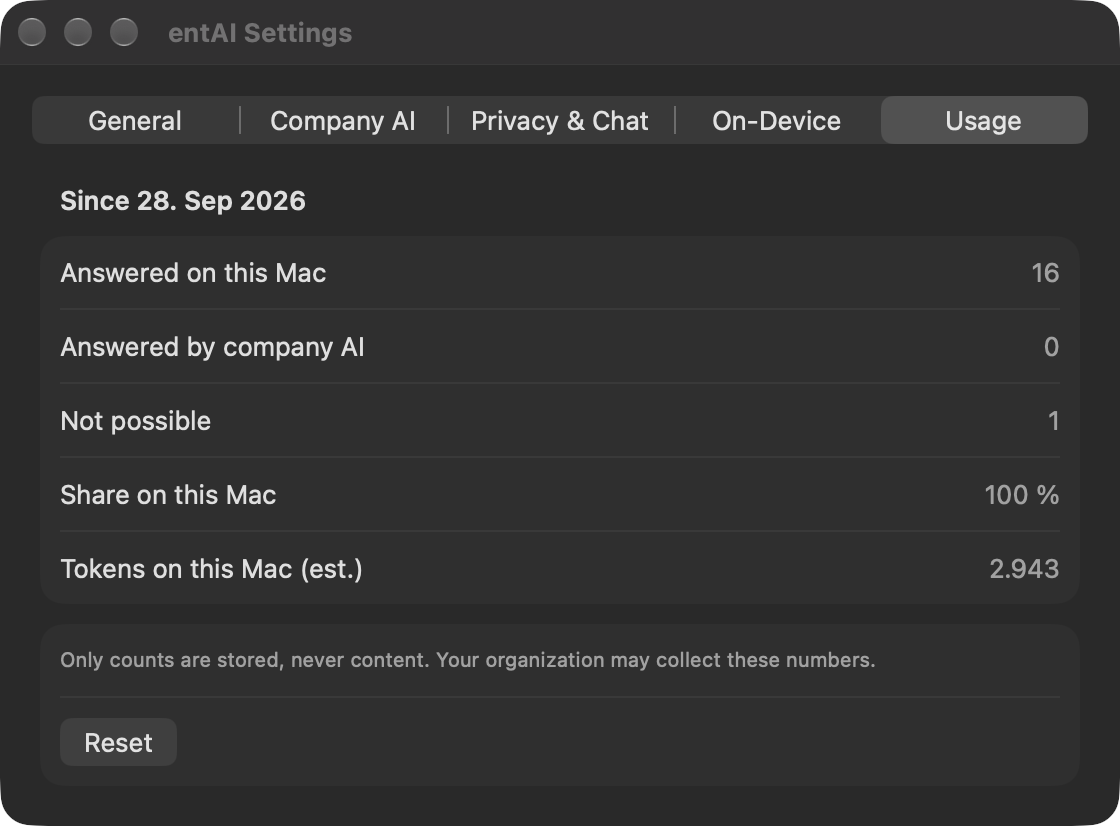
Scripts/ea-entai-usage.sh reports, for the console user, from ~/Library/Application Support/entAI/UsageStats.plist — counts only, never content:
<result>local=120 cloud=30 refused=2 localShare=80% localTokens=412000 cloudTokens=98000 since=2026-09-28</result>Disable collection entirely with UsageStatsEnabled = false.
Troubleshooting
| Symptom | Cause / fix |
|---|---|
| No entAI entries under Services | Log out and back in once after install, or run /System/Library/CoreServices/pbs -update; check System Settings → Keyboard → Keyboard Shortcuts → Services |
| ⌥⌥ only works inside entAI; Replace only copies | Accessibility isn't allowed yet — grant it via PPPC or System Settings → Privacy & Security → Accessibility |
| "On-device model not available: not enough free memory" | Free memory is below what the model needs right now; with a company AI configured, the request routes there instead |
| "The company AI is not available (…)" | The bracketed reason names what's missing — address, model, API key, or sign-in; check with Settings → Company AI → Test Connection |
| HTTP 401 / 403 | Wrong key, an expired Entra sign-in, or a missing role on the Azure OpenAI resource |
| HTTP 404 | Wrong model/deployment name or endpoint address |
| Long pause, then "Thinking…" | The cloud model is a reasoning model and streams its reasoning before any visible answer — pick a non-reasoning model for speed |
Logs: log show --predicate 'subsystem == "com.spectrechen.entai"' --last 1h --info — routing decisions with token estimates, never content.
Uninstall: sudo Scripts/uninstall.sh (add --purge to also remove each user's history, stats and keychain items).