Documentation
Deploying, configuring and supporting Heimdall.
Overview
Heimdall is a local diagnostics app for macOS. A deterministic rule engine checks the Mac and produces findings with a severity (critical, warning, info). An on-device language model (Gemma 4 E2B, bundled) explains those findings and answers users' questions. Every question automatically carries the current check results and the matching sections of your IT documentation, so the assistant doesn't ask users to run commands or paste logs.
The window has two parts: the checks (left) run without AI and show every finding with its explanation, recommendation and measured values; the assistant (right) answers questions.
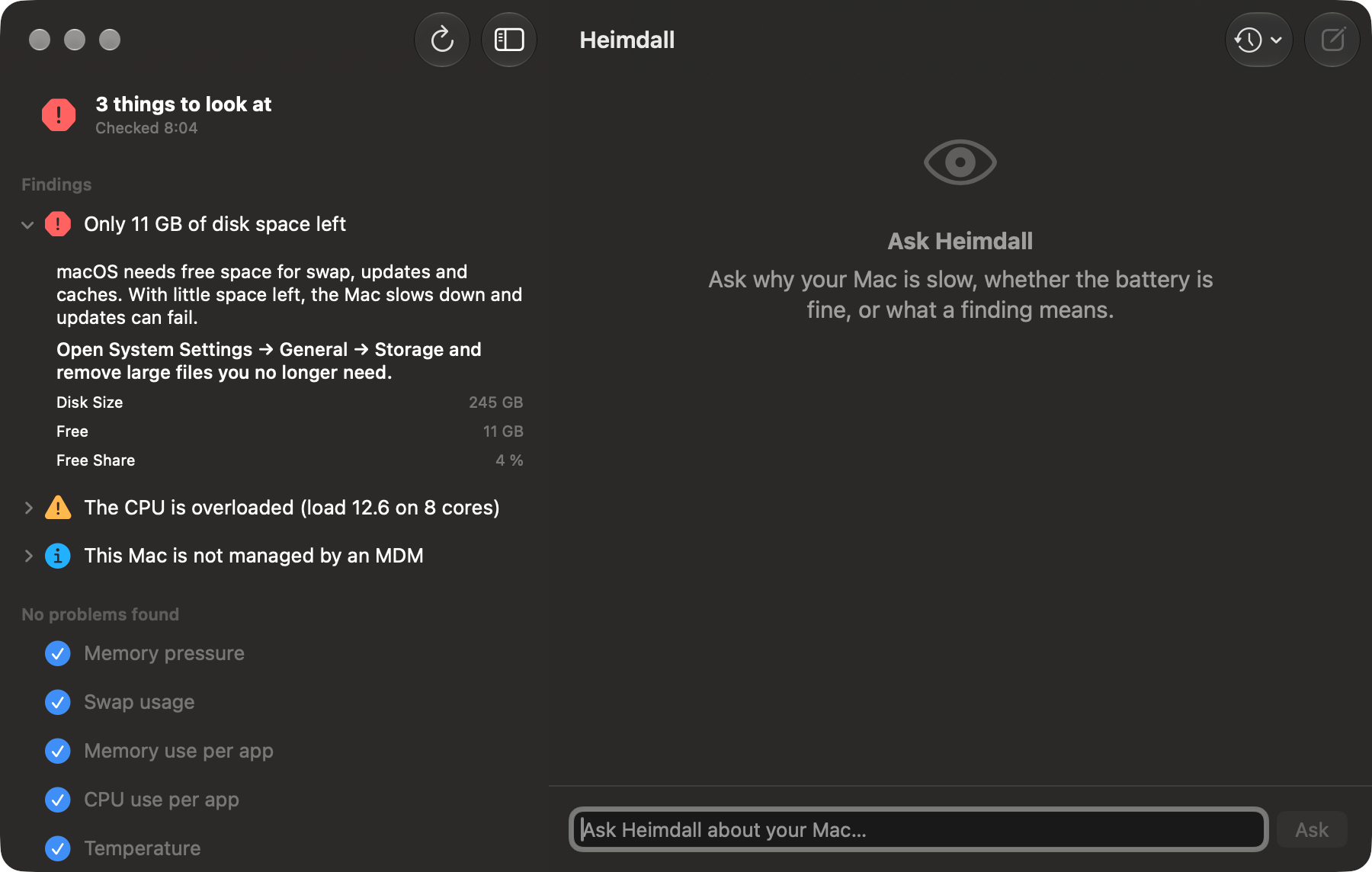
The model explains; it never decides. It sees the rule engine's report (refreshed when older than 2 minutes) and never raw system values. It introduces itself as Heimdall, declines requests that aren't about the Mac or IT, and answers questions about its own identity with fixed text. Nothing is sent over the network unless you configure an external OpenAI-compatible server.
Requirements
| macOS | 26 or later |
| Hardware | Apple silicon (M1 or later) |
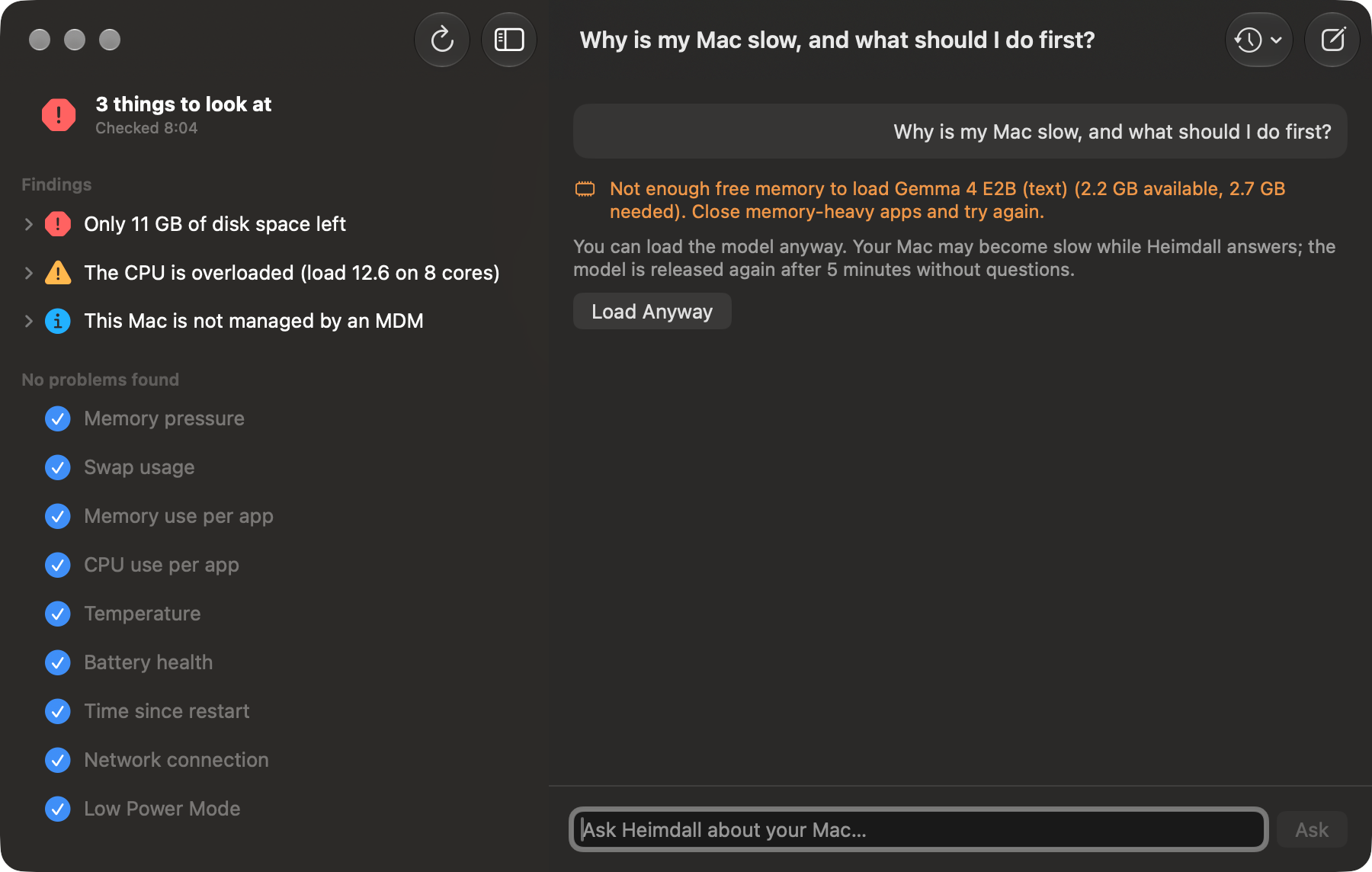
| Memory | 8 GB or more. The model needs about 2.7 GB of free memory while it answers; with less, users see Load Anyway. |
| Disk | About 2.5 GB for the app (the model is inside the bundle) |
| Rights | Runs as the logged-in user. No root helper, no kernel or system extensions. |
Deployment
Heimdall-0.2.0.pkg is signed (Developer ID Installer) and notarized. It installs /Applications/Heimdall.app and nothing else — no LaunchAgents, no daemons.
- Jamf Pro: upload the package (Settings → Packages), then deploy it with a policy (e.g. Self Service or recurring check-in). The package is ~2.4 GB; plan distribution-point capacity and bandwidth accordingly.
- Microsoft Intune: add a macOS app (PKG) and upload the package. Check your tenant's package size limit.
- Other MDMs: any tool that installs a signed flat package works.
shasum -a 256 Heimdall-0.2.0.pkg
# 878821e1780a4d82cb86c3c259eeeffd5c9d25a402cb2808571387347b478bbf
spctl --assess --type install -v Heimdall-0.2.0.pkg   # → Notarized Developer ID
The first launch after installation can take up to a minute while macOS verifies the large app bundle. Later launches are fast.
Managed Settings
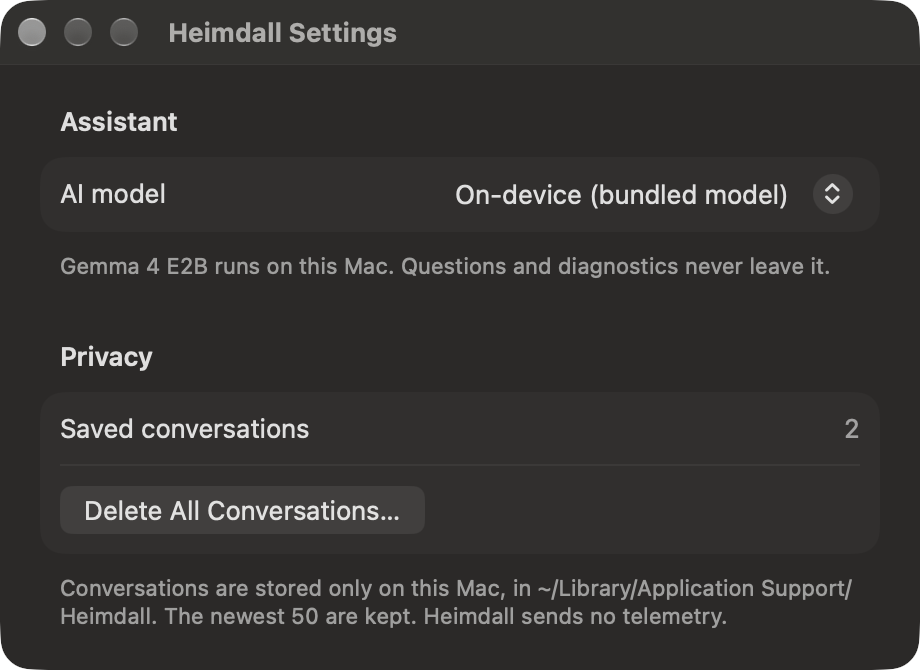
Heimdall reads Managed Preferences in the domain com.spectrechen.heimdall. A value forced by a configuration profile overrides the user's choice; the control then shows as locked (“Managed by your organization”).
| Key | Type | Default | Meaning |
|---|---|---|---|
LLMBackend | string | mlx | mlx = the bundled on-device model. openAICompatible = an OpenAI-compatible server (company gateway, Ollama, LM Studio). |
OpenAIBaseURL | string | http://localhost:11434/v1 | Base URL of the server when LLMBackend is openAICompatible. |
OpenAIModel | string | (empty) | Model name on that server. |
DocumentationPath | string | /Library/Application Support/Heimdall/Documentation | Folder with your IT documentation (see below). |
SupportContact | string | (empty) | How users reach IT, e.g. IT Service Desk · +49 30 1234 5678. Shown in Settings and added to answers that recommend contacting IT. |
Heimdall sends no API key, so an external server must accept requests without one (typical for local servers or an internal gateway). With openAICompatible, the rule engine's report and users' questions are sent to that server. Check thresholds are not configurable yet.
For Jamf Pro, the preference domain can be configured through Application & Custom Settings → External Applications with Heimdall's settings schema, so the keys appear as a form.
IT Documentation
Give Heimdall your organization's guides (VPN, printers, software requests, policies…) and its answers use them and name the document they come from.
- Put the documents into a folder and deploy it to
/Library/Application Support/Heimdall/Documentation(for example as a package), or pointDocumentationPathat another folder the users can read. - Supported formats: Markdown, text, PDF, Word (
.docx), RTF and HTML. Subfolders are included; up to 500 files of up to 25 MB each. - Heimdall reads the folder at launch and when the user clicks Check Again. Settings → Organization shows how many documents were found.
Documents are split into sections at their headings and searched locally with a keyword ranking (no internet, no second model; German and English). The best three sections are attached to each question. Nothing leaves the Mac.
The on-device model follows short, unambiguous text best: one topic per heading with numbered steps below it, instructions written positively and explicitly (“Move large videos to OneDrive”), no “don't … unless …” constructions, and the words users will type in the headings. Example documents are in Examples/Documentation in the distribution.
System Checks
All checks run as the logged-in user. Heimdall leaves its own process out of the per-app checks (its memory is mostly the model).
| Check | Warning | Critical |
|---|---|---|
| Memory pressure | macOS reports warning | macOS reports critical |
| Swap usage (of installed memory) | ≥ 35 % | ≥ 75 % |
| Memory use per app | one process ≥ 20 % of installed memory | — |
| CPU load (5-min average per core) | ≥ 1.5 | ≥ 2.5 |
| CPU use per app | one process ≥ 80 % of a core | — |
| CPU throttling | kernel_task ≥ 50 % (the Mac is too warm) | — |
| Temperature (thermal state) | serious (info at fair) | critical |
| Battery health (capacity vs. new) | < 80 %; info at ≥ 1,000 cycles | — |
| Free disk space | < 10 % or < 20 GB | < 5 % or < 8 GB |
| Time since restart | ≥ 30 days (info at ≥ 14) | — |
| Network connection | no route | — |
| Low Power Mode | info when on | — |
Device Management Checks
| Check | Source | Findings |
|---|---|---|
| MDM enrollment | profiles status -type enrollment | Info: not managed. Warning: an MDM agent is installed but the Mac isn't enrolled; enrollment not user approved (and not ADE). |
| MDM profile | system_profiler SPConfigurationProfileDataType | Warning: the MDM profile's signature is not verified. The managing vendor is read from the profile's server URL and decides which agent checks apply. |
| MDM errors | Unified log, mdmclient, last 24 h | Info with examples when ≥ 5 errors. Enrolled Macs only; harmless noise filtered out. |
| Jamf Pro agent | /var/log/jamf.log | Warning after 2 days without a check-in, critical after 7; errors in the last 7 days; info when inventory is older than 7 days. |
| Microsoft Intune agent | Intune agent logs | Warning after 2 days without activity; errors in the last 7 days. Company Portal alone no longer counts as an Intune agent. |
Kandji, Workspace ONE, Addigy and Mosyle agents are detected and listed, without detailed checks yet.
Beta note: the Jamf Pro and Intune checks were built against the documented log formats and tested with sample logs; 0.2.0 fixes issues from the first tests on a managed Mac in a demo environment; nothing has been tested in production. Please report findings that look wrong.
Data & Logs
| What | Where |
|---|---|
| Conversations | ~/Library/Application Support/Heimdall/Conversations/ — one JSON file each, newest 50 kept; deletable in the app |
| AI model | Inside the app bundle |
| IT documentation | /Library/Application Support/Heimdall/Documentation (or DocumentationPath) |
| App log | Unified log, subsystem com.spectrechen.heimdall |
log show --last 1h --predicate 'subsystem == "com.spectrechen.heimdall"'Troubleshooting
| Symptom | Cause / fix |
|---|---|
| “Not enough free memory to load Gemma 4 E2B …” | Less than ~2.7 GB is free. Close memory-heavy apps, or click Load Anyway (the Mac may be slow while Heimdall answers). |
| First launch takes a long time | macOS verifies the 2.5 GB app once after installation. |
| Documentation isn't used | Settings → Organization shows the number of documents. Check the folder path and that users can read it; click Check Again after deploying new files. |
| A Settings control is greyed out | A configuration profile forces the value. |
| “Can't read the Jamf log” / “Intune agent logs” | The log is missing or not readable for the user; nothing for the user to do. |
| An external server doesn't answer | Check OpenAIBaseURL, OpenAIModel, and that the server accepts requests without an API key. |
Known Issues (Beta)
- The Jamf Pro and Intune checks have been tested with sample logs, not yet on a managed Mac.
- The on-device model can misread documentation that uses negations or several steps in one sentence (see the writing tips above).
- Vendor detection uses the MDM profile's server URL; self-hosted servers of vendors other than Jamf Pro fall back to the installed agents.
- Answers can take 20–60 seconds on an 8 GB Mac, longer when memory is short.
- Check thresholds and the list of checks can't be configured yet.
Uninstall
sudo rm -rf /Applications/Heimdall.app
sudo pkgutil --forget com.spectrechen.heimdall.pkg
rm -rf ~/Library/Application\ Support/Heimdall     # per user: conversations