Documentation
Merging MDM profile fragments into enforced AI-agent policy.
Overview
AI agent tools such as Claude Code, Codex and opencode read an administrator-managed policy file from a fixed location. MDM can deliver one profile per preference domain, so "company rules plus department rules plus a pilot" doesn't fit in one profile — and the tools don't read profiles themselves.
Mimir splits the problem. You deploy several small fragments, each a configuration profile in its own domain, scoped by MDM to the right Macs. On the Mac, a root LaunchDaemon (mimird) merges the fragments that arrived and writes one policy file per tool into that tool's managed location. It re-applies the result and reverts edits.
Why a merge, not an override: a department fragment can narrow the company baseline but never widen it. Mimir applies the more restrictive rule per key, regardless of fragment priority.
Requirements
- macOS 26 or later. The package's minimum is 26; testing so far was on macOS 27 only.
- An MDM that can install custom configuration profiles. Jamf Pro schemas and extension attributes, and Intune custom attributes, are included.
- Administrator rights on the Mac for the install (a LaunchDaemon and managed policy files).
Deployment
Mimir-0.2.1.pkg is signed (Developer ID Installer) and notarized. For managed deployment, download the distribution bundle (6.9 MB): the package plus profiles, example fragments, Jamf and Intune files, the signed catalog, tools and docs.
shasum -a 256 Mimir-0.2.1.pkg
# db5e8d87d78129770de7d48f29dca43cc618a995b4e4128903956d10755e527c
spctl --assess --type install -v Mimir-0.2.1.pkg   # → Notarized Developer ID
Deploy in this order:
Profiles/Mimir-ManagedLoginItems.mobileconfig— lets the daemon run without a user prompt.- The organisation key profile — only if your fragments contain
MIMIR-ENCsecrets. - The package. Its postinstall installs
/Library/Application Support/Mimir/(withbin/mimirctl), links/usr/local/bin/mimirctl, installs the bundled catalog and startscom.spectrechen.mimir.daemon. An upgrade stops the daemon first. - Optionally
Examples/profiles/Mimir-settings.mobileconfig(daemon settings). - Your fragments.
The loose mimirctl in the bundle's Tools/ folder has the same code signature as the notarized copy inside the package, but no notarization ticket can be stapled to a bare command-line binary, and a quarantined download of it hasn't been tested. The package puts mimirctl on the PATH. The zip also contains macOS metadata files (._*) next to every file.
The admin guide in the bundle refers to Scripts/make-org-key.sh and Scripts/make-key-profile.sh; in the bundle both are in Tools/.
Fragments
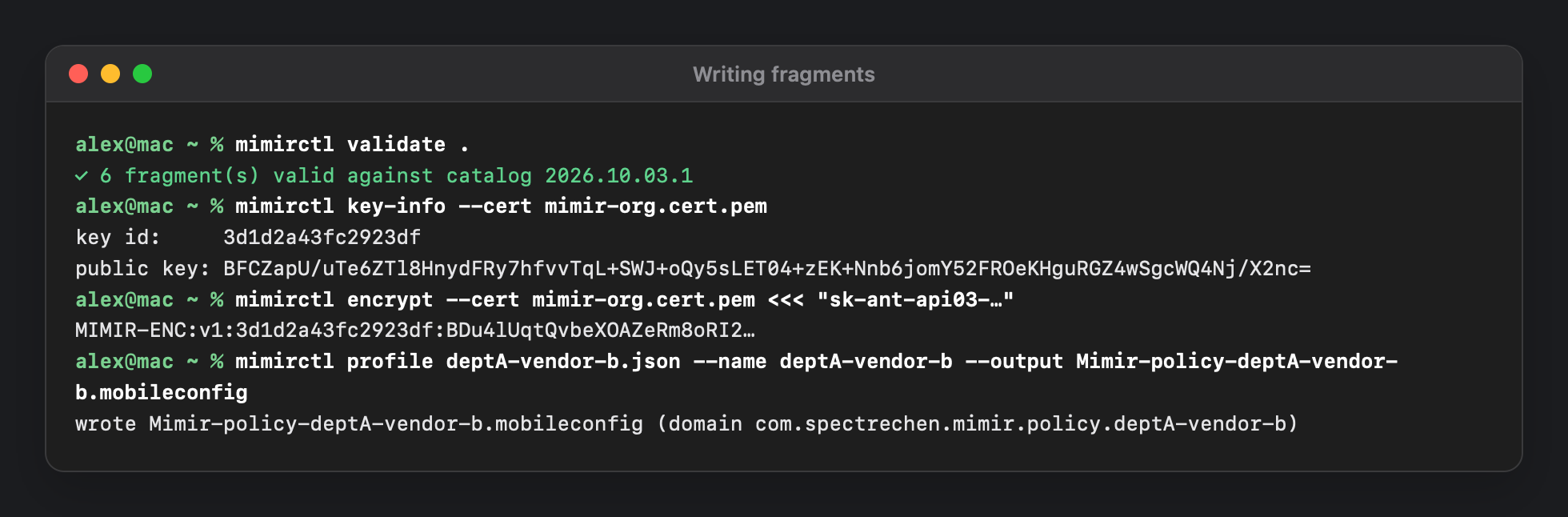
Each fragment is a configuration profile with one payload in the domain com.spectrechen.mimir.policy.<name> — a separate domain per fragment, because macOS doesn't merge profiles for the same domain. Profile UUIDs are derived from the name, so regenerating a profile updates it in place. Mimir reads fragments from /Library/Managed Preferences/ on the device channel only; user-channel profiles are ignored.
| Key | Type | Meaning |
|---|---|---|
PolicyID | string | Name in reports. Default: the domain suffix. |
Priority | integer | Default 0. The higher value wins for single values where no stricter rule applies. |
Description | string | Free text. |
Enabled | boolean | false ignores the fragment. |
Harnesses | dict | Tool id → output id → the tool's own settings, in its native format. |
HarnessesJSON | string | The same as JSON text, for the Jamf textarea. Use one of the two; setting both is a fragment error. |
Use mimirctl profile fragment.json --name my-fragment --output Mimir-policy-my-fragment.mobileconfig to generate a profile, and mimirctl schema for the Jamf custom schema.
How Fragments Merge
Fragments are ordered by Priority (highest first), ties by PolicyID. Then:
- Objects merge recursively.
- Arrays are unioned, duplicates removed.
- Scalars come from the highest-priority fragment.
- Catalog rules per path override 1–3. The more restrictive rule always wins, independent of priority.
- Deny wins: a deny list removes entries after the merge.
- Rendering drops keys the tool doesn't allow (with a warning) and internal keys (silently), and writes sorted keys, so output is deterministic.
| Rule | Effect | Used for |
|---|---|---|
intersect | Only values every fragment allows remain. Disjoint lists give an empty list and a warning. | Allowlists: available models, approval policies, sandbox modes, providers, workspace folders |
strictest | The most restrictive value in a defined order. | Sandbox mode, approval policy, share, permission levels, disableBypassPermissionsMode |
anyTrue | On if any fragment turns it on. | Locks such as allowManagedMcpServersOnly |
anyFalse | Off if any fragment turns it off. | Kill switches such as isLocalDevMcpEnabled |
min / max | Smallest or largest number. | cleanupPeriodDays, autoUpdaterEnforcementHours |
union | Everything any fragment lists. | Grants: allowed MCP servers, permissions.allow |
replace | Highest priority wins. | Everything without a stricter rule |
Rules apply per key; Mimir doesn't check dependencies between keys. For Codex, if you narrow allowed_sandbox_modes, also set the matching sandbox_mode default.
Worked Example
The distribution's Examples/ folder has a fictional company, ACME. Everyone gets org-baseline and security-deny. Department A also gets deptA-baseline (priority 10), which wants Codex to be read-only and to allow only vendor A's MCP server.
Preview 1 — everyone. Codex files as Mimir would write them:
── OpenAI Codex CLI · requirements → /etc/codex/requirements.toml
allowed_approval_policies = ["untrusted", "on-request"]
allowed_sandbox_modes = ["read-only", "workspace-write"]

── OpenAI Codex CLI · managed-config → /etc/codex/managed_config.toml
approval_policy = "on-request"
sandbox_mode = "workspace-write"
Preview 2 — department A. The allowlist intersects to read-only, and the stricter default wins:
── OpenAI Codex CLI · requirements → /etc/codex/requirements.toml
allowed_approval_policies = ["on-request", "untrusted"]
allowed_sandbox_modes = ["read-only"]

── OpenAI Codex CLI · managed-config → /etc/codex/managed_config.toml
approval_policy = "on-request"
sandbox_mode = "read-only"
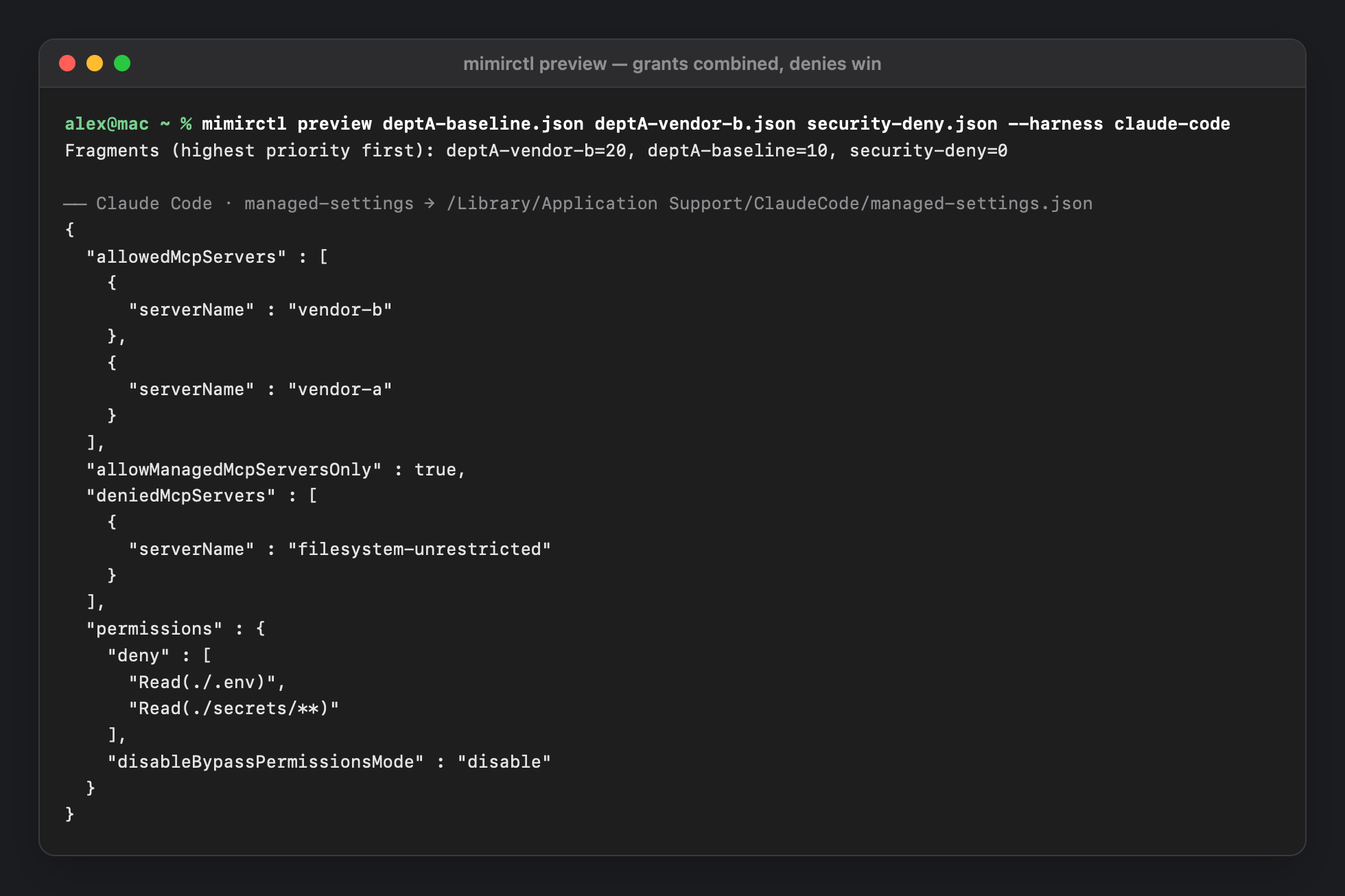
The same department-A fragment also sets allowManagedMcpServersOnly: true and only vendor-a in Claude Code, merges mcp.vendor-a into opencode, and turns Claude Desktop's local MCP switch off. Adding deptA-vendor-b (priority 20) for some users in the department adds vendor-b, whose Authorization header travels as a MIMIR-ENC value.
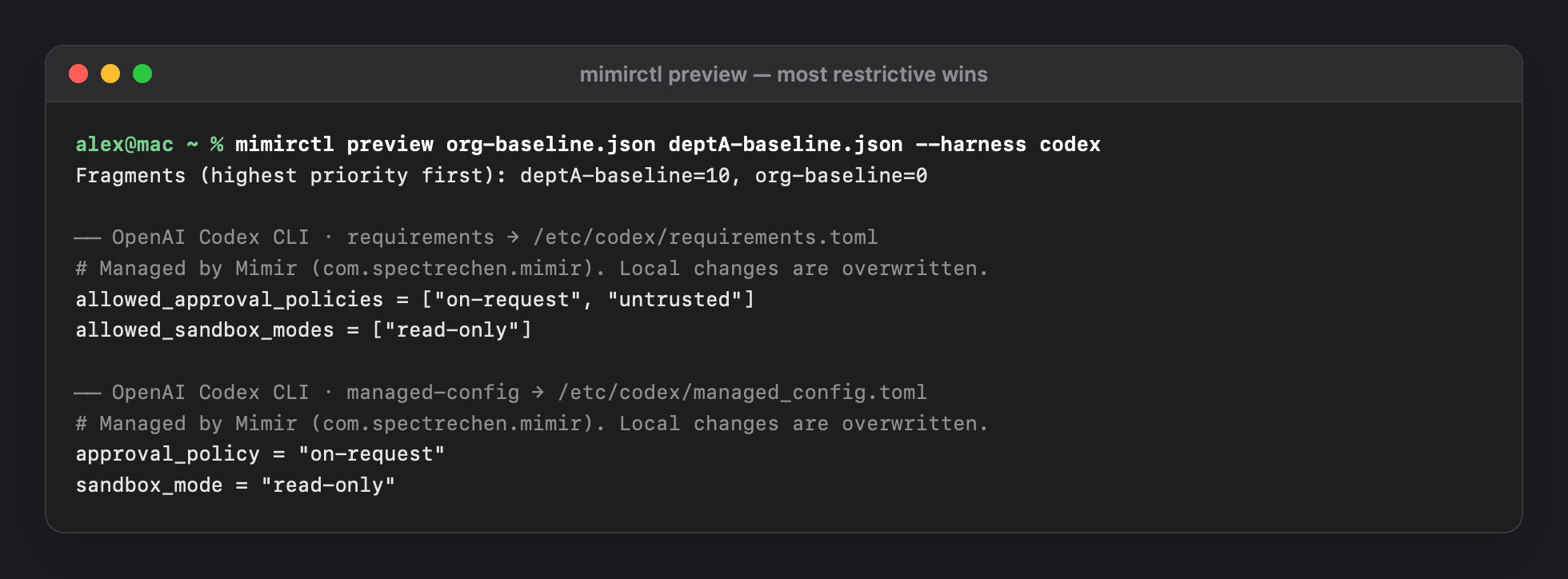
The distribution ships four ready previews (Examples/previews/), generated with mimirctl preview, and a profile per fragment in Examples/profiles/. Only department A exists as an example; a department B would be your own fragment.
Supported Tools
The signed catalog (schema 2, version 2026.10.03.1) lists 18 tools. Four are applied; the other 14 are discovery-only — Mimir finds them but writes nothing.
| Tool | Status | Files Mimir writes |
|---|---|---|
| Claude Code | supported | /Library/Application Support/ClaudeCode/managed-settings.json, managed-mcp.json |
| Claude Desktop | experimental | /Library/Managed Preferences/com.anthropic.claudefordesktop.plist |
| opencode | supported | /Library/Application Support/opencode/opencode.json |
| OpenAI Codex CLI | supported | /etc/codex/requirements.toml, /etc/codex/managed_config.toml |
| Discovery only: Gemini CLI, GitHub Copilot CLI, Cursor, VS Code (GitHub Copilot Chat), Windsurf, Goose, Cline, Claw Code, Kiro CLI, Droid CLI, Amp CLI, Warp, Muse Code, Crush. | ||
“Supported” means the catalog knows the tool's documented admin location, not that Mimir's files were confirmed to take effect in a live session. The catalog's own review rules say a tool is promoted to supported only after testing on a managed Mac; no such test of any tool has been recorded yet (see What's Verified). Claude Desktop is experimental because Apple doesn't document this approach for third parties — macOS may remove the plist when profiles change, and Mimir rewrites it within seconds.
The catalog also records the keys that merge, for example: for Claude Code, permissions.allow/ask and MCP allow-lists union, permissions.deny and deniedMcpServers remove entries, availableModels intersects, the allowManaged…Only keys are locks, and cleanupPeriodDays takes the minimum.
The catalog is signed with Ed25519 and refreshes from CatalogURL (every 24 h by default) without a new app release. A path allowlist compiled into the binary decides where the root daemon may write, so a signed catalog cannot widen it.
Vendor Precedence
Don't deploy vendor-native profiles for the same tools (com.anthropic.claudecode, com.anthropic.claudefordesktop, ai.opencode.managed, com.openai.codex) next to Mimir. Mimir reports a warning when it sees one but doesn't resolve the conflict.
- Claude Code: an MDM profile for
com.anthropic.claudecodeoutranks the file. With the defaultfirst-winsbehaviour it hides Mimir's file completely. Claude Code 2.1.242 or later can opt in tomergein that profile. - Codex:
requirements.tomloutranks cloud-managed defaults, which outrankmanaged_config.toml.allowed_sandbox_modesis documented as legacy; Codex 0.138.0 or later prefersallowed_permission_profiles.
Enforcement
- Mimir fully owns each output file: it compares the desired bytes (SHA-256 and mode) with what's on disk. The first takeover backs the existing file up to
/Library/Application Support/Mimir/backups/. - Writes are atomic (temp file,
fsync, ownerroot:wheel, rename) and refuse symlinks anywhere in the path. Files are root-owned, mode 0644. - Triggers: daemon start; every
ReapplyInterval(900 s by default); a profile list change; changes in/Library/Managed Preferences; changes to an output file or its folder (a tamper is reverted after about 2 seconds, counted asdriftCorrected); andmimirctl apply. - 0.2.1: Mimir restarts
cfprefsdafter writing or removing a file in Managed Preferences, and removes vendor folders it created once they're empty. - Fragments must be root-owned regular files, or they're ignored.
Fail-safe behaviour
| Situation | What Mimir does |
|---|---|
| No valid catalog | Health error; last applied files are re-enforced, nothing is removed. |
| A fragment can't be parsed | Health degraded; everything is frozen at the last applied state, because the broken fragment might carry a deny. |
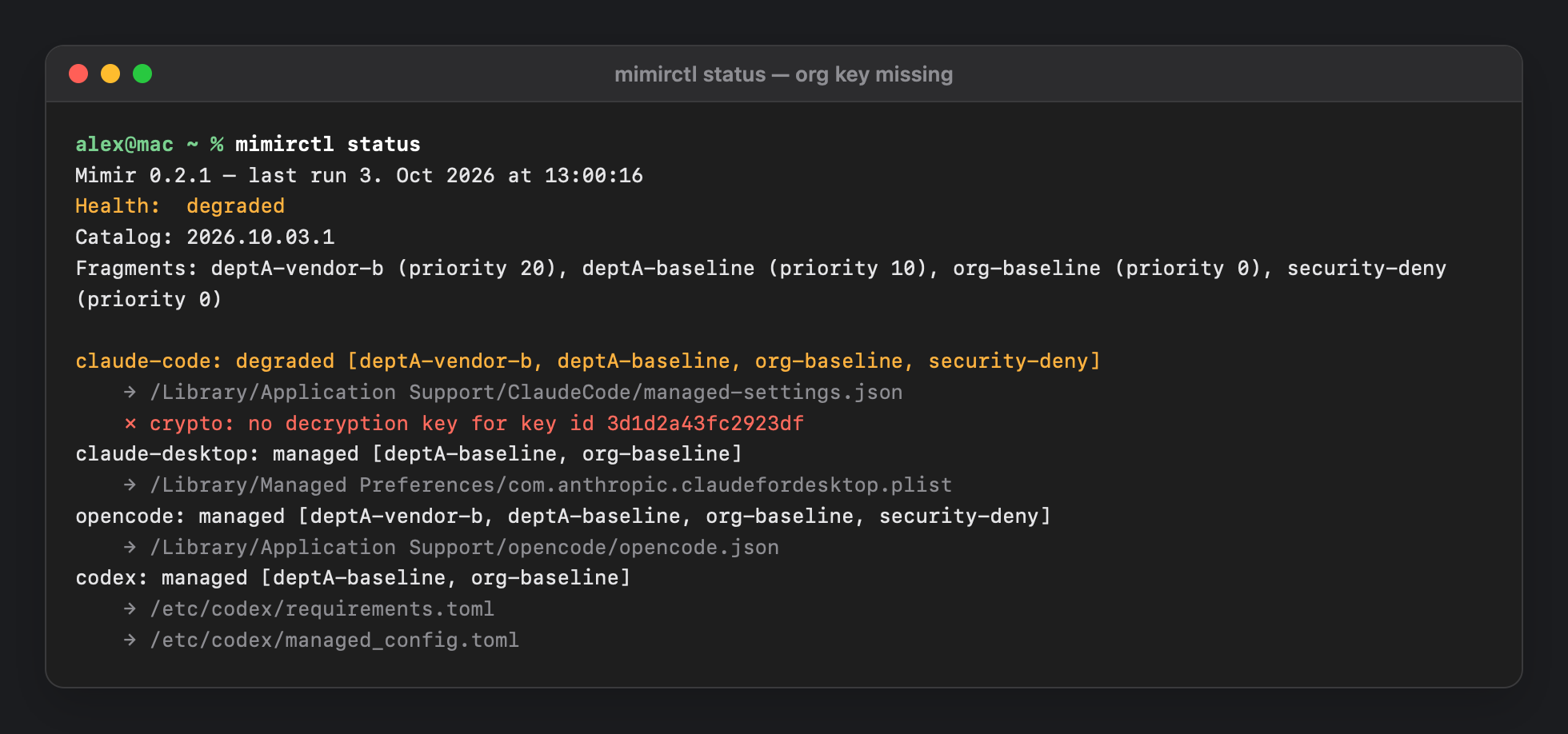
| A secret can't be decrypted | That tool stays at its last applied output; the others carry on. |
DisabledHarnesses | Mimir releases those tools immediately: backups are restored or files removed. |
DryRun | Plans and reports, writes nothing. |
| Planned (discovery-only) tool | Never applied; status says so. |
Settings
Daemon settings live in the domain com.spectrechen.mimir (Jamf schema and an example profile are included).
| Key | Type | Default | Meaning |
|---|---|---|---|
ReapplyInterval | integer (s) | 900 | Periodic re-apply. Minimum 60. |
CatalogURL | string | the project's catalog release URL | Where to fetch catalog.json; catalog.json.sig must sit next to it. |
CatalogPinnedVersion | string | — | Accept only this catalog version; also permits going back. |
CatalogRefreshInterval | integer (s) | 86400 | How often to check for a catalog. The code enforces a minimum of 300. |
CatalogTrustedKeys | array | — | Extra Ed25519 public keys (base64), for a mirror you sign yourself. |
AdditionalAllowedPaths | array | — | Extra absolute path prefixes (ending in /) the daemon may write to. |
DisabledHarnesses | array | — | Tool ids to release immediately — an admin kill switch. |
DryRun | boolean | false | Compute and report only. |
Mimir's own folders, .. components and symlinked directories are always refused as write paths.
Encrypted Secrets
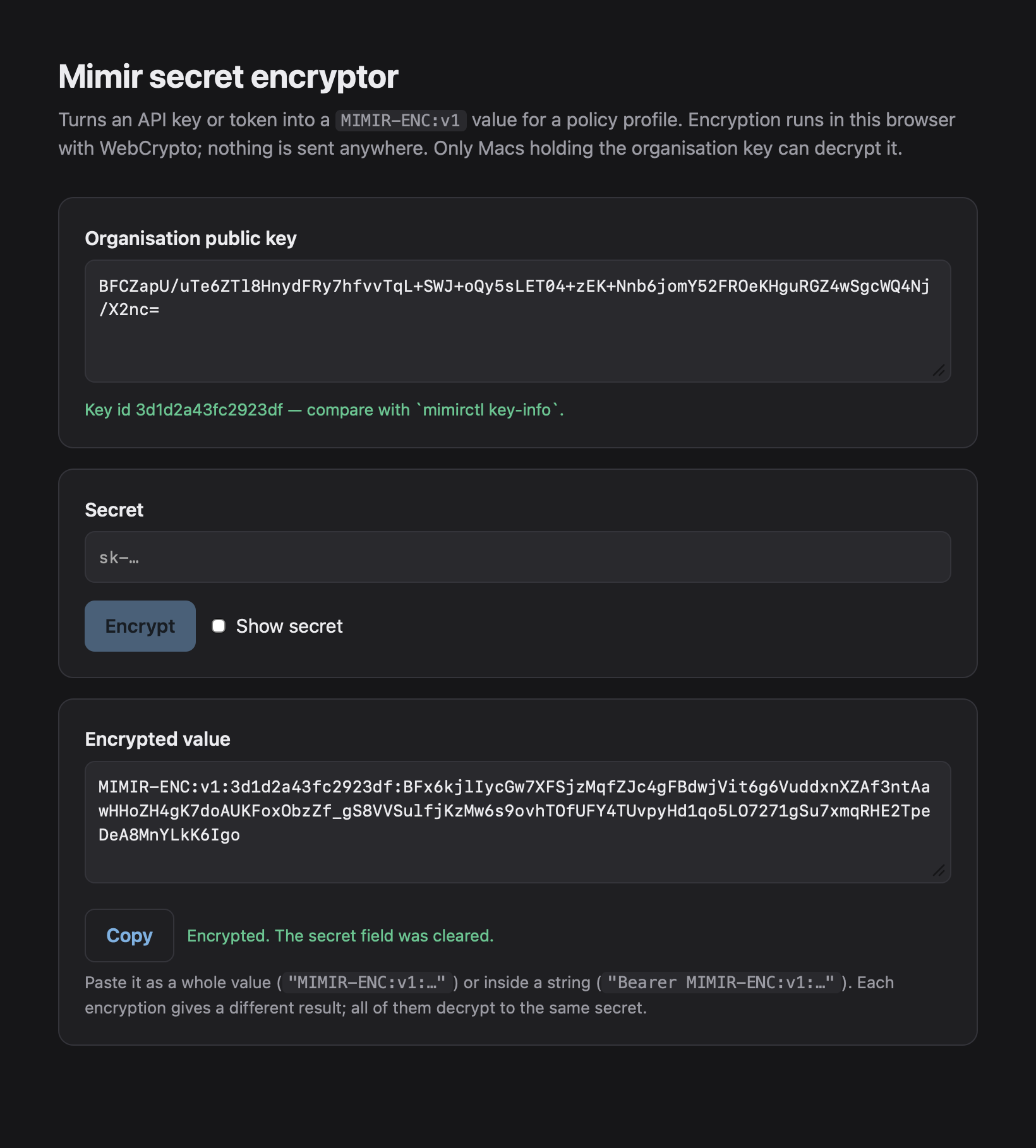
Tokens and auth headers in a fragment should be MIMIR-ENC values, so they don't sit in clear text in profiles, MDM exports or screenshots. Envelopes can be embedded in a string, e.g. Bearer MIMIR-ENC:v1:….
MIMIR-ENC:v1:<kid>:<base64url( ephemeral key ‖ nonce ‖ ciphertext ‖ tag )>
P-256 ECDH → HKDF-SHA256 (info "mimir-enc-v1") → AES-256-GCM- Create an organisation key once on an admin Mac with
make-org-key.sh; it produces a public certificate, a.p12identity for MDM and a private key to keep offline. - Deploy the key to Macs as a profile (
make-key-profile.sh) or Jamf's Certificate payload. The device holds the identity in the System keychain, not extractable;mimirduses it through the Security framework so the private key never leaves the keychain. A PEM file in/Library/Application Support/Mimir/keys(root, 0600) also works. - Encrypt each secret with
mimirctl encrypt --cert mimir-org.cert.pem(the value from stdin, not the command line) or the offlineencrypt.html.
What this doesn't protect: the decrypted secret appears in the vendor file, which the user of that Mac can read. Encryption protects the profile, the MDM export and console screenshots — not the endpoint. To rotate the key, deploy the new key profile next to the old one, re-encrypt your fragments, then remove the old one; automatic re-encryption isn't part of v1. DEMO-ONLY-key.pem in the examples decrypts the demo secrets only — never use it.
Discovery
Discovery answers “which AI agent tools are on this Mac, and are they managed?”. It uses the catalog's detection hints: executables, app bundle IDs in /Applications and ~/Applications, running processes and user config paths. It only checks that config files exist and never reads their contents and never runs a binary it found. Versions come from Info.plist, package.json or version-named folders. Unmanaged and discovery-only tools are included, so it doubles as a shadow-AI inventory.
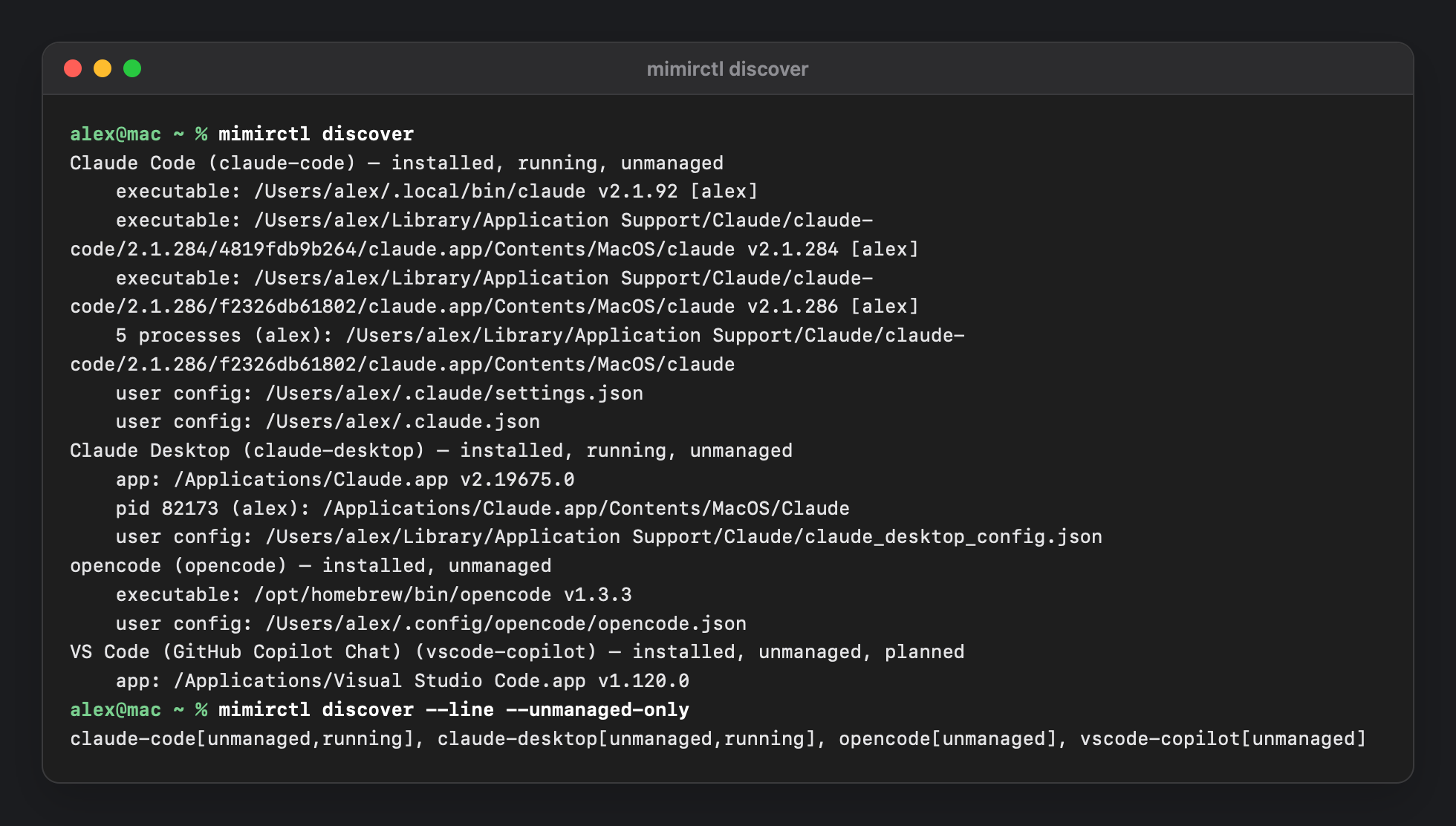
mimirctl discover, and the one-line form for extension attributes.Reporting
/Library/Application Support/Mimir/status.json(0644) holds health, catalog version, fragments and errors, per-tool state, last-run changes and the inventory. It never contains secrets.- Unified log, subsystem
com.spectrechen.mimir(daemon,reconcile). - Jamf: three extension attributes — status, unmanaged tools, and tool inventory. Suggested smart groups: status
not-installedor likedaemon-not-loaded; likedegradedorerror; unmanaged tools notnone. - Intune: two custom attributes (String) for status and unmanaged tools.
ok | catalog 2026.10.03.1 | managed claude-code,claude-desktop,opencode,codex | last run 2m agoHealth is ok, degraded or error; tool states are managed, unmanaged, degraded, error or disabled.
mimirctl
mimirctl status [--json] [--check] [--line] [--file <status.json>]
mimirctl discover [--json] [--all] [--line] [--unmanaged-only] [--catalog <file>]
mimirctl apply [--local]                 # root: re-apply now (signals mimird, or run in-process)
mimirctl preview <paths…> [--catalog] [--harness] [--key]   # show the files, write nothing
mimirctl simulate <paths…> --catalog <file> --out <dir> [--key]   # full pass into a folder
mimirctl validate <paths…> [--catalog]
mimirctl encrypt [--cert <cert>] [value]   /   decrypt --key <pem> [value]   /   key-info [--cert]
mimirctl profile <input> [--name] [--settings] [--organization] [--output]
mimirctl schema [--settings] [--catalog]
mimirctl catalog sign|verify|install|update
status --check exits 1 unless health is ok. preview and simulate accept .json, .plist or .mobileconfig files or folders, so you can test policy without a Mac that has MDM. Restart the daemon with sudo launchctl kickstart -k system/com.spectrechen.mimir.daemon.
What's Verified
Tested: 59 unit tests pass in 9 suites. Mimir 0.2.0 was installed from the notarized package on one Mac (macOS 27, not enrolled in MDM; none of the vendor paths existed beforehand), with two harmless fragments placed by hand. The pkg installed and the daemon started as root; fragments were applied about 2 seconds after they appeared; priority, union, deny and intersect/strictest results were as expected; a MIMIR-ENC secret decrypted into the vendor file only; files were root-owned with content matching mimirctl preview; tampering (a widened Codex sandbox, a deleted opencode file) was reverted in about 3 seconds; removing a fragment re-merged and removing all fragments removed the outputs; the extension-attribute scripts and uninstall.sh worked.
Not verified:
- No AI tool was run to confirm it actually reads Mimir's file. For Claude Code, Codex and opencode, the paths are the vendors' documented admin locations; a session-level check is still open. For Claude Desktop only the macOS-level check passed (the value shows as managed); applying it after an app relaunch wasn't confirmed.
- The organisation key delivered as an MDM certificate payload. Tested: the PEM file fallback and the Security-framework code path in unit tests.
- 0.2.1 on a Mac. The test ran 0.2.0; the two 0.2.1 fixes (
cfprefsdrestart, folder cleanup) have unit tests only. - A real MDM deployment (the Jamf custom schema, Intune profile, Managed Login Items enforcement). The test placed fragments by hand.
- macOS 26, and Macs enrolled in MDM.
- Whether Codex matches MCP server identity in
requirements.tomlas expected, and whether Claude Code outputs should use drop-in files — open questions.
Known limits: per-user fragments aren't supported; fourteen tools are discovery-only; secrets are readable on the endpoint (see above); the documentation bundle has small stale spots (the design document still says v0.1.0).
Uninstall
sudo "/Library/Application Support/Mimir/uninstall.sh" [--keep-policy]It stops the daemon and, unless you pass --keep-policy, restores the backed-up original of each managed file or removes it. It then deletes the LaunchDaemon, /usr/local/bin/mimirctl and the support folder, and forgets the package. Remove the fragment and Managed Login Items profiles from your MDM afterwards.